
Follow the steps below to get started with your Owl.
- Turn your Owl over and plug in the USB cable and power adapter.
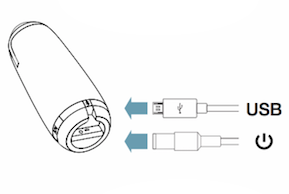
- Plug the USB cable into your computer, and plug the power adapter into an outlet. Wait until Owl’s eye stop pulsing, and you hear a hoot. Now your Meeting Owl is ready to use.
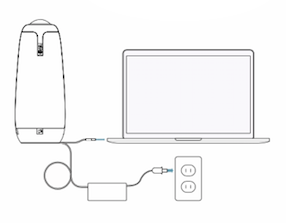
- Place your Owl on your table.
- Open your video conferencing platform and select the Meeting Owl as your video, microphone and speaker. Now you are ready to start your meeting! Your Owl’s eyes will illuminate when video is streaming.
Feel free to experiment with the placement of the Owl to best suit your meeting’s needs.
You will need to download the app located in self service to access the camera lock features. (Meeting Owl)
Comments
0 comments
Please sign in to leave a comment.